Local search has changed shape. A decade ago, “ranking locally” mostly meant showing up somewhere on page one. Today, the real battle happens in a much smaller space: the Google Local Pack, Google Maps, and increasingly, AI-generated answers that summarize local businesses before a searcher ever clicks a link.
Google Business Profile (GBP) sits at the center of all of it. It’s the data source Google leans on to decide which businesses to show, in what order, and with what information attached – hours, reviews, photos, services, and more. For a local business, GBP is no longer a “nice to have” directory listing. It’s core infrastructure for visibility.
The problem is that most businesses stop at the easy part. They claim their profile, verify it, fill in the basics, and consider the job done. That used to be enough. It isn’t anymore. Google’s local ranking systems have grown more sophisticated, review signals matter more than ever, and AI-powered search experiences are now evaluating the same profile data in new ways.
This guide walks through what Google Business Profile is, how it connects to local SEO and Google Maps visibility, and exactly how to optimize every part of your profile heading into 2026 – including how GBP intersects with AI Overviews and AI Mode.
What Is Google Business Profile?
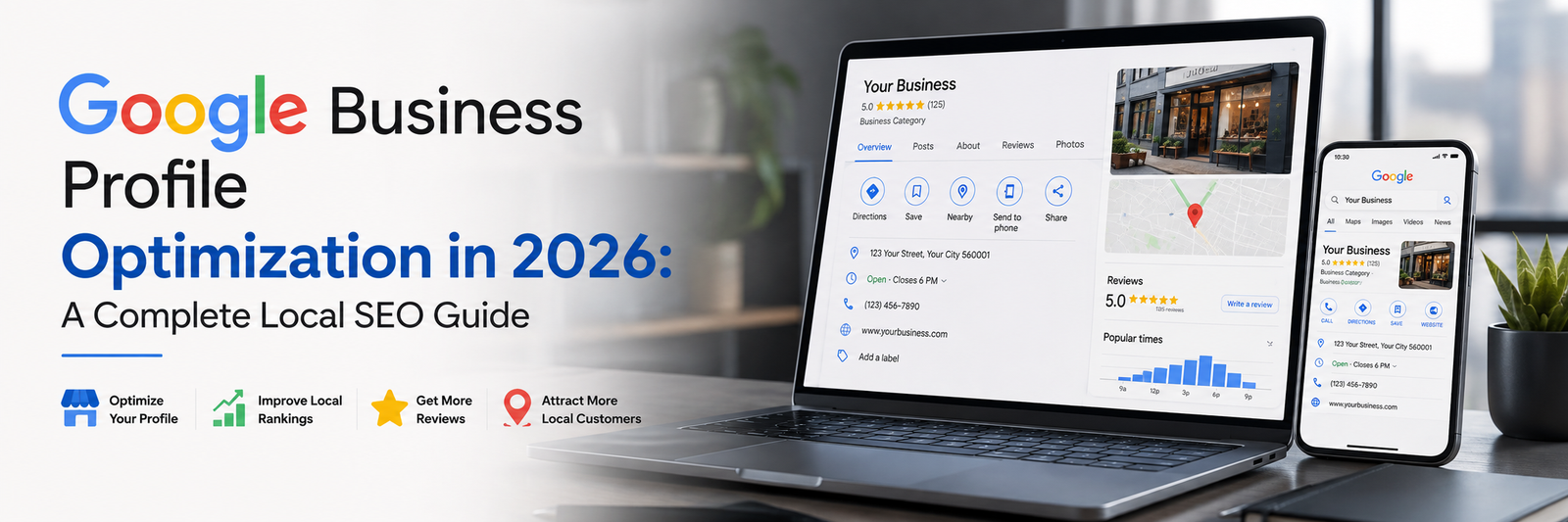
Google Business Profile is the free tool Google provides for businesses to manage how they appear across Google Search, Google Maps, and the Local Pack. It’s where a business controls its name, address, phone number, hours, photos, services, description, and reviews – essentially the digital storefront Google shows to nearby searchers.
Google Business Profile vs Google My Business
If you’ve been managing your listing for a while, you may still think of it as “Google My Business” or “GMB.” Google rebranded the product to Google Business Profile a few years back, folding much of the management experience directly into Search and Maps rather than a separate app. The functionality is largely the same – but you’ll still see plenty of people searching for “GMB optimization” or “GMB verification,” so both terms are worth knowing.
Why Google Business Profile Matters for Local SEO
A fully optimized GBP influences where and how your business shows up in:
- Google Search results for local queries
- Google Maps search and navigation
- The Local Pack (the map plus three business listings shown for local intent searches)
- Knowledge panels that appear when someone searches your business name directly
- Local discovery features, including “near me” and category-based browsing
In other words, GBP isn’t a side project sitting next to your SEO strategy – it’s one of the primary inputs into it.
How Google Business Profile Supports Local SEO in 2026
Google has long said that local ranking comes down to three broad factors: relevance, distance, and prominence. You can’t change how far a searcher is from your business, but you have significant control over the other two.
Google Maps and Local Pack Visibility
Maps and Local Pack rankings pull heavily from your GBP data – category selection, business information completeness, proximity, and engagement signals like clicks, calls, and direction requests all play a role.
Relevance and Business Information
Relevance is about how well your profile matches what someone is searching for. Accurate categories, a clear business description, and complete service listings all help Google understand exactly what you do and who you serve.
Reviews and Reputation
Review count, review recency, and average rating are consistently cited as some of the strongest prominence signals available to local businesses. This is one of the few areas where sustained effort compounds significantly over time.
Website and Local SEO Signals
Your GBP doesn’t operate in isolation. Google cross-references your listing against your website – matching business information, checking for relevant local content, and looking at overall site authority.
GBP and AI-Powered Search
Recent industry research, including Whitespark’s 2026 local search ranking factors study, has started explicitly measuring AI Search visibility alongside traditional local ranking factors – a sign that the same profile signals now feed both classic search results and newer AI-generated summaries. We’ll cover this in more depth later in the guide.
How to Claim and Verify Your Google Business Profile
If you haven’t claimed your profile yet – or you’re not sure whether someone already has – start here.
Find or Create Your Business Profile
Search for your business name on Google or go directly to Google Business Profile Manager to check whether a profile already exists.
Claim Your Existing Profile
If a profile already exists (sometimes auto-generated by Google), you can request ownership through the verification process rather than creating a duplicate.
Verify Your Business
Verification typically happens by postcard, phone, email, or video, depending on your business type and category. Choose the fastest available method and complete it promptly – an unverified profile has limited visibility.
What to Do If You Cannot Verify Your Business
If standard verification methods aren’t available, Google offers alternative verification paths for certain business types. Contact Google Business Profile support directly if you’re stuck.
Avoid Duplicate Google Business Profiles
Duplicate listings split your reviews, confuse customers, and can actively hurt your local visibility. If you find a duplicate, request that it be merged or removed through Google’s official process.
Complete Your Google Business Profile Information
A complete profile isn’t just more informative – it’s a stronger relevance signal. Make sure the following are filled in and kept current:
- Business name (exactly as it appears in the real world – no keyword stuffing)
- Address
- Phone number
- Website
- Business hours, including special/holiday hours
- Service areas (for businesses that travel to customers)
- Business description
- Opening date
- Contact information
Keep Your NAP Information Consistent
NAP stands for Name, Address, and Phone number. This exact combination needs to match across your website, your GBP listing, business directories, social profiles, and any local citations. Inconsistent NAP data confuses Google’s understanding of your business and can weaken trust signals tied to local citations and citation building efforts.
Choose the Right Google Business Profile Categories
Categories are one of the strongest relevance signals available in GBP, and they deserve careful attention.
How to Choose Your Primary Category
Your primary category should describe your core business as specifically as possible. A general category (“Restaurant”) is rarely as effective as a specific one (“Italian Restaurant”) when a more precise option exists.
How to Select Secondary Categories
Secondary categories can capture additional services you genuinely offer, expanding the range of searches you’re eligible to appear in.
Common GBP Category Mistakes
The most frequent mistakes are choosing an overly broad primary category, selecting categories that don’t accurately reflect the business, and adding categories purely to appear in more searches.
Should You Add Every Relevant Category?
No. Add categories that are genuinely relevant and accurate. Google’s local algorithms reward relevance, not volume – irrelevant categories can dilute your profile’s clarity rather than strengthen it.
Optimize Your Google Business Profile Services
The services section lets Google (and customers) understand the specific work you do.
Add All Relevant Services
List every core service you offer – for an SEO agency, that might include local SEO, technical SEO, content marketing, and digital marketing strategy.
Write Useful Service Descriptions
Each service should include a short, genuinely useful description rather than a one-line placeholder.
Use Relevant Search Terms Naturally
Write for the customer first. Natural language that reflects how customers actually search tends to outperform forced keyword insertion.
Keep Services Updated
Revisit this section whenever your offerings change – an outdated services list undersells what you actually do.
Write an Effective Google Business Profile Description
Your business description is one of the few areas where you have real creative control. A strong description covers:
- What the business does
- Who it serves
- Main services or products
- Location or service area
- What differentiates the business from competitors
- Relevant keywords, used naturally
Google Business Profile Description Best Practices
Write in clear, plain language, lead with what matters most to customers, and avoid repeating the same keyword phrase multiple times.
GBP Description Mistakes to Avoid
Avoid keyword stuffing, exaggerated claims, promotional language that reads like an ad, and generic descriptions that could apply to any business in your category.
Add and Optimize Photos and Videos
Visual content should include your logo, cover image, exterior and interior shots, team photos, and product or service images, along with short videos where relevant.
Prioritize quality, relevance, and authenticity over volume – real photos of your actual business consistently outperform generic stock imagery. Whitespark’s 2026 research specifically calls out photo and video quality, relevance, and recency as factors now being evaluated across both local search and AI search visibility, reinforcing that this isn’t just a cosmetic section.
Use Google Business Profile Posts Effectively
Google Posts let you share updates, offers, events, new services, and announcements directly on your profile.
How Often Should You Post on GBP?
Consistency matters more than frequency – even a modest, regular cadence signals an actively managed profile.
What Should You Post?
Genuine updates: new services, seasonal offers, events, or content that reflects what’s actually happening in your business right now.
GBP Post Best Practices
Keep posts current, avoid duplicate or stale content, and include a clear call to action where relevant.
Get More Google Reviews and Manage Your Reputation
Why Google Reviews Matter for Local SEO
Reviews are consistently one of the strongest local ranking signals, influencing both visibility and click-through decisions once a searcher sees your listing.
How to Ask Customers for Reviews
Ask at the right moment – right after a positive interaction – and make the process as easy as possible with a direct link.
How to Respond to Positive Reviews
Thank the reviewer specifically and briefly, avoiding generic copy-paste replies.
How to Respond to Negative Reviews
Respond calmly and professionally, acknowledge the concern, and offer a path to resolution offline where appropriate.
Why Review Quality and Relevance Matter
Detailed, specific reviews that mention services or location terms tend to carry more weight than short, generic ones.
What Not to Do With Google Reviews
Never incentivize positive reviews, submit fake reviews, or attempt to manipulate review counts. These practices violate Google’s policies and put your entire profile at risk.
Optimize Google Business Profile Q&A
The Q&A section allows anyone to ask public questions about your business. Monitor it regularly, provide accurate answers promptly, and seed it with a few genuinely useful questions and answers if it’s currently empty. Watch for spam or irrelevant submissions and flag them when necessary.
Add Products, Attributes and Other GBP Features
Google Business Profile Products
Showcase specific products with images, descriptions, and pricing where relevant.
GBP Attributes
Attributes let you highlight specifics like accessibility features, payment options, or service style.
Booking and Appointment Features
If your category supports it, connect a booking or appointment link directly to your profile.
Messaging and Contact Options
Enable messaging where available so customers can reach you directly from your listing.
Availability of these features varies by business category and region, so check what’s currently offered for your specific profile.
Google Business Profile and Your Website
GBP should complement your website, not replace it. The two work best when they reinforce each other through:
- Relevant landing pages
- Local keyword targeting
- Location and service pages
- Internal linking
- Consistent business information
- Local content
- Schema markup
- Strong overall website experience
Create a Strong GBP Landing Page
Link your profile to a page that reflects exactly what a local searcher is looking for – not just your homepage.
Connect GBP With Local SEO
Local landing pages, local schema markup, and location-specific content all reinforce the signals your GBP is already sending.
Maintain Consistent Business Information
Your website’s NAP data, service descriptions, and category-relevant content should match your GBP listing exactly.
Google Business Profile and AI Search in 2026
This is one of the areas where local SEO guidance has genuinely shifted. Google’s AI-powered search features – including AI Overviews and AI Mode – increasingly draw on structured, verifiable business information rather than open web crawling alone. That makes GBP relevant in a new way: it’s a clean, structured source of entity information about your business.
What seems to matter most for this kind of visibility:
- Accurate, consistent business information across GBP and your website
- Strong, genuine review signals
- Clear entity information (what your business is, does, and serves)
- Overall consistency between your website and your profile
It’s worth being precise here: an optimized GBP does not guarantee that a business will appear in ChatGPT, Gemini, or any specific AI assistant’s answers, and no single GBP field is a confirmed AI ranking factor. What the current evidence supports is more modest but still meaningful – accurate, consistent, well-maintained business and entity information supports visibility across modern search experiences generally, GBP included.
Common Google Business Profile Mistakes to Avoid
- Choosing the wrong primary category
- Keyword stuffing the business name
- Inaccurate or outdated business information
- Duplicate profiles
- Inconsistent NAP data
- Ignoring reviews entirely
- Leaving the services section empty
- Uploading low-quality images
- Never updating the profile
- Ignoring customer questions
- Creating or soliciting fake reviews
- Using misleading business information
- Ignoring unauthorized edits to your profile
- Neglecting the website connected to your GBP
How to Measure Google Business Profile Performance
GBP Performance Metrics
Track these regularly:
- Search impressions and views
- Google Maps visibility
- Website clicks
- Phone calls
- Direction requests
- Messages
- Booking actions
- Review growth
- Local Pack rankings
- Keyword visibility
- Conversion actions
Tools for Measuring Local SEO
Google Business Profile’s own Insights, Google Search Console, Google Analytics, Google Maps, and dedicated local rank tracking tools all provide different pieces of the performance picture – use them together rather than relying on any single source.
Google Business Profile Optimization Checklist for 2026
- ☐ Claim and verify profile
- ☐ Correct business name
- ☐ Correct primary category
- ☐ Relevant secondary categories
- ☐ Complete business information
- ☐ Accurate hours
- ☐ Service areas defined
- ☐ Business description written
- ☐ Complete services list
- ☐ Relevant attributes added
- ☐ Products added where applicable
- ☐ High-quality photos uploaded
- ☐ Videos added
- ☐ Regular posts/updates scheduled
- ☐ Active review management
- ☐ Q&A monitored
- ☐ Website connected and aligned
- ☐ NAP consistency confirmed
- ☐ Local citations checked
- ☐ Local landing pages in place
- ☐ Performance tracking set up
- ☐ Regular profile audits scheduled
How Honeycomb Can Help With Local SEO
Optimizing a Google Business Profile is straightforward in theory but time-consuming to do well and maintain consistently – especially alongside everything else running a local business requires.
Honeycomb’s Local SEO services connect the dots between your GBP, your website, and your broader SEO strategy: keyword research, on-page SEO, technical SEO, content marketing, and ongoing performance tracking, all working together rather than in isolation.
Looking to improve your local visibility and attract more customers from Google Search and Maps? Honeycomb can help build a data-driven local SEO strategy aligned with your business goals.
FAQs About Google Business Profile Optimization
What is Google Business Profile optimization?
It’s the process of completing, refining, and actively managing every part of your GBP listing – information, categories, photos, posts, and reviews – to improve local visibility.
How do I optimize my Google Business Profile?
Start with complete and accurate information, choose precise categories, add detailed services, upload real photos, post regularly, and actively manage reviews.
Does Google Business Profile help with SEO?
Yes. It’s one of the primary signals feeding local search rankings, and it directly supports visibility in the Local Pack and Google Maps.
How do I rank higher on Google Maps?
Focus on relevance (accurate categories and complete information), and prominence (reviews, engagement, and overall online presence).
How important are Google reviews for local SEO?
Very. Review count, rating, and recency are consistently among the strongest local ranking signals available to businesses.
How often should I update my Google Business Profile?
Regularly – review hours and information for accuracy monthly, and post updates or offers on an ongoing basis rather than leaving the profile static.
Does Google Business Profile affect AI search visibility?
It can contribute, since AI-powered search features rely on accurate, consistent business and entity information – but no single GBP field guarantees visibility in AI-generated answers.
What is the difference between Google Business Profile and Google My Business?
They’re the same product. Google My Business was rebranded as Google Business Profile, though many people still search using the older “GMB” terminology.